PDF Splitter: one long PDF in, every chapter out
Long-form philosophy and literature are commonly distributed as a single enormous PDF with several books inside it. Every tool available for breaking one into chapters required uploading the file to a third-party server first. I designed and built the alternative: it reads the document's own table of contents, returns one file per chapter, and never sends the document anywhere.
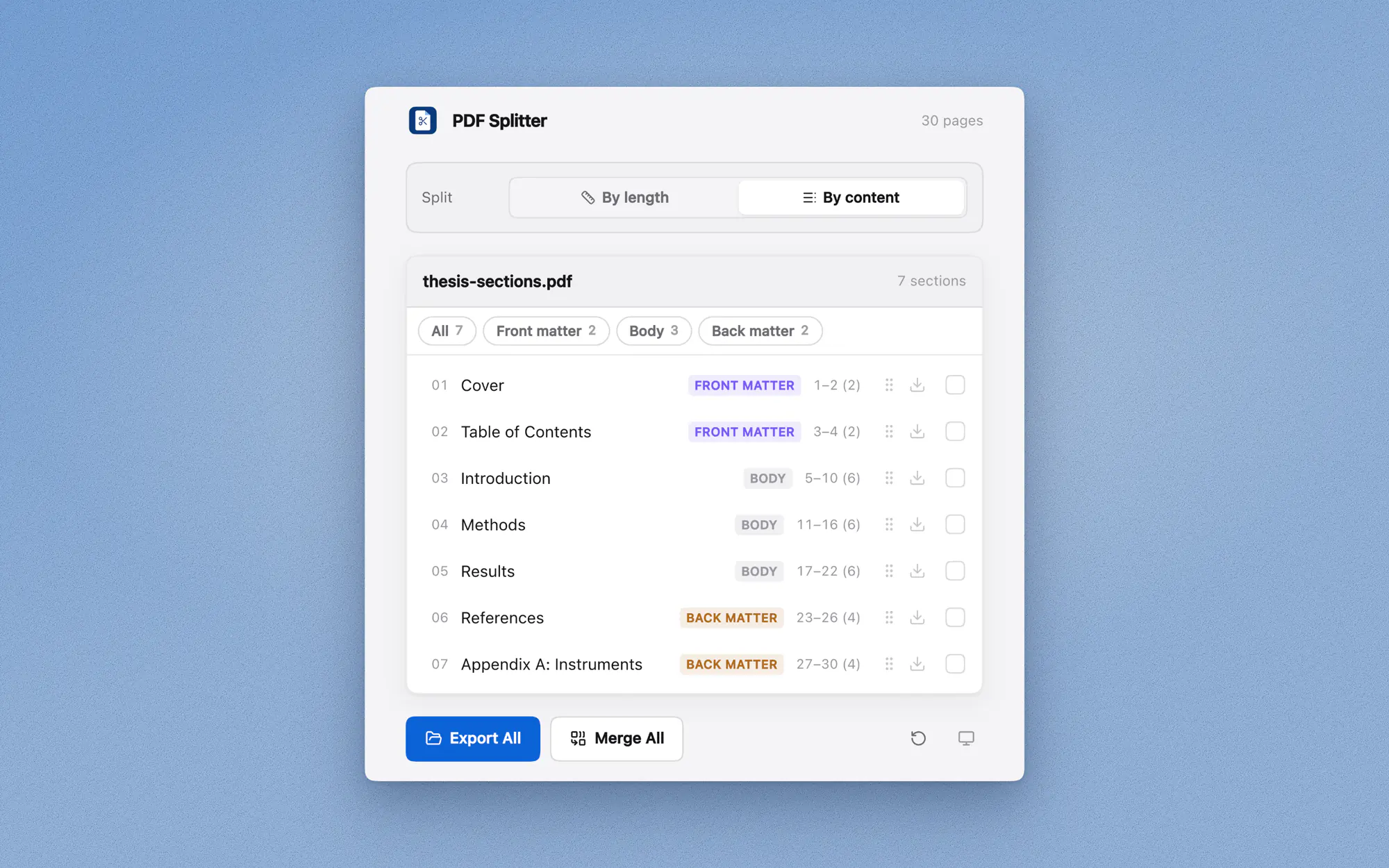
PDF Splitter takes one PDF and hands back one file per chapter. Boundaries come from the document's own table of contents. Where there is none, they are inferred from the typography. Where the pages are scans, the operating system's text recogniser reads them first.
I designed and built all of it, the interface and the engine underneath. React and TypeScript for the app, Rust behind a Tauri shell for the desktop build, and one shared core that both targets run unchanged.
It is free and MIT licensed. It runs in a browser with no install, or as a download for macOS and Windows. Everything happens on the device: no account, no upload, no telemetry, and it works with the network switched off.
How it started
PDF Splitter began in 2025 as a tool I wrote for myself. Philosophy and literature are commonly distributed as scanned or OCR'd PDFs that run to a few hundred megabytes and hold several volumes in one file. Performance was the visible complaint and the wrong one: the real problem was that the document is the wrong unit of work. Reading these in Obsidian means a PDF in one pane and notes in the other, one note per chapter, against a file that has no concept of a chapter.
The cost compounded the moment a file had to move. Putting one chapter into Notion or Drive meant uploading all twenty-four. Sending someone a single section meant sending the whole volume. A great deal of deadweight travelled for the sake of thirty pages.
The first version was deliberately blunt: read the table of contents, write every chapter out as its own file, stop. It stayed a private script for about a year.
University work approached the same problem from the opposite direction and turned it into a project. An assignment is finalised as one PDF, and then Turnitin or SafeAssign wants the body only: no table of contents, no references, no appendix. The available options were exporting a second version from the Word file, or deleting pages from a copy in Preview at the risk of overwriting the original. That is a request for chapters three to nine and nothing else. Adding a selection model is the change that made the tool worth publishing, and the rewrite built around it is the public version.
Who it turned out to be for
I gave builds to people whose work resembled my own: students, academics, and office staff who handle documents all day. The testing was informal, with no protocol and no written findings, just the app in someone's hands against their own files. It still produced a pattern I had not designed for.
Anyone with a serious research workflow already has Zotero or a reference manager, and those tools do far more than this one ever will. The people who kept using it were at the other end. They had a long document, they wanted one part of it, and their only options were a browser upload or a full research suite they had no reason to learn.
Privacy came up repeatedly, and never as an abstract preference. A thesis under embargo. An unpublished manuscript. A contract. An internal report that was fine to read and not fine to upload. The objection was never that browser tools are bad. It was that uploading was a step these people were not permitted to take, which left them doing the job by hand in Preview.
Working out where a chapter ends
This is the hard part of the problem, and everything else is plumbing. A PDF has no idea it contains chapters; it contains pages. There are three ways to recover the structure, and the app tries them in order of how much it has to guess.
Read the document's own table of contents
Most PDFs worth splitting already carry an outline, the bookmarks in the sidebar. That is the author's own answer to where the chapters are, so it gets used before anything cleverer is attempted. Outlines nest, though. A Depth control appears whenever there is more than one level, and it states what each option costs in files instead of leaving that to be discovered by exporting.
It opens at the shallowest depth that produces more than one section, which is not always the top level: title pages are usually set in the largest type in the book, so they often occupy a whole level on their own.
Infer it from the typography when there is no outline
Scans and hurried exports frequently have no outline at all. Then the text layer gets clustered by font size: the size covering the most characters is taken as the body, and anything meaningfully larger becomes a heading candidate. A tier only survives if it behaves like one, meaning few occurrences, short lines, and most of them near the top of a page.
The app states when it has inferred structure instead of reading it, and gives a confidence level alongside. I treated that as more important than the accuracy itself. A tool that quietly guesses wrong about a 600-page document wastes an hour before anyone notices, and the remedy is to be explicit about which kind of answer is on screen.
Read the scan when there is no text at all
Scanned PDFs are page images with nothing underneath, so there is no text layer to cluster. When almost nothing turns up, pages get rendered and handed to the text recogniser the operating system already ships: Vision on macOS, Windows.Media.Ocr on Windows. Nothing is bundled and no language data is downloaded, which keeps the binary at a few megabytes and keeps the whole thing working offline. It is also why recognition is the one feature the browser build cannot offer.
The join is the part worth explaining. Recognised lines come back with bounding boxes, and box height stands in for font size, which is the signal heading detection already runs on, so the detector works on a scan without knowing it is looking at one. Confidence is capped below high for recognised text, and only the first 40 pages are processed, which is enough to establish whether a heading pattern exists at all.
If none of the three produces anything convincing, it divides the page count into equal parts, which needs no structure and is occasionally what was wanted.
The interface
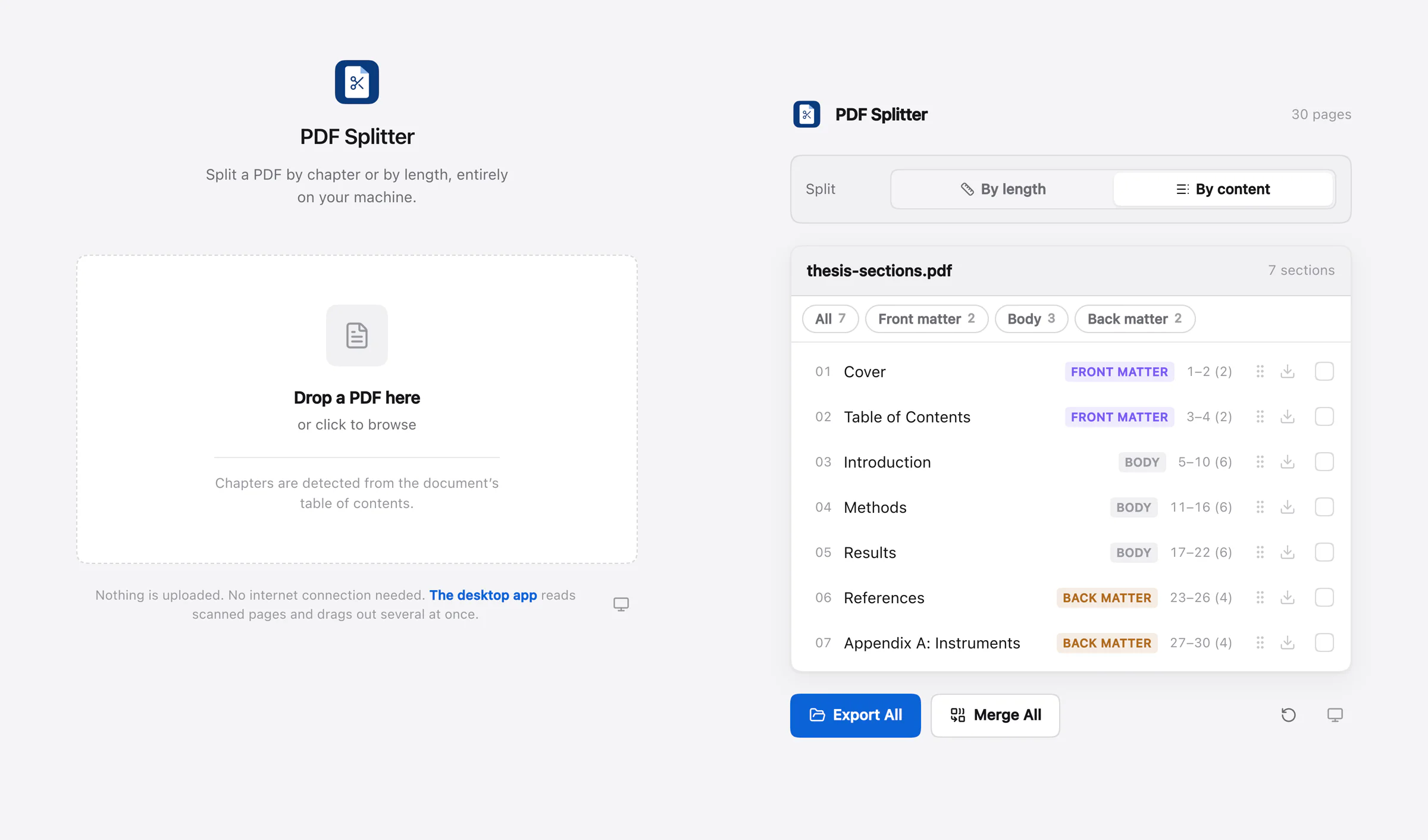

One screen. It starts as a drop target and becomes the section list once there is a file in it. No project, no library, no import step. The whole job takes about fifteen seconds, so anything that asked for setup first would cost more than it saved.
Selecting by group
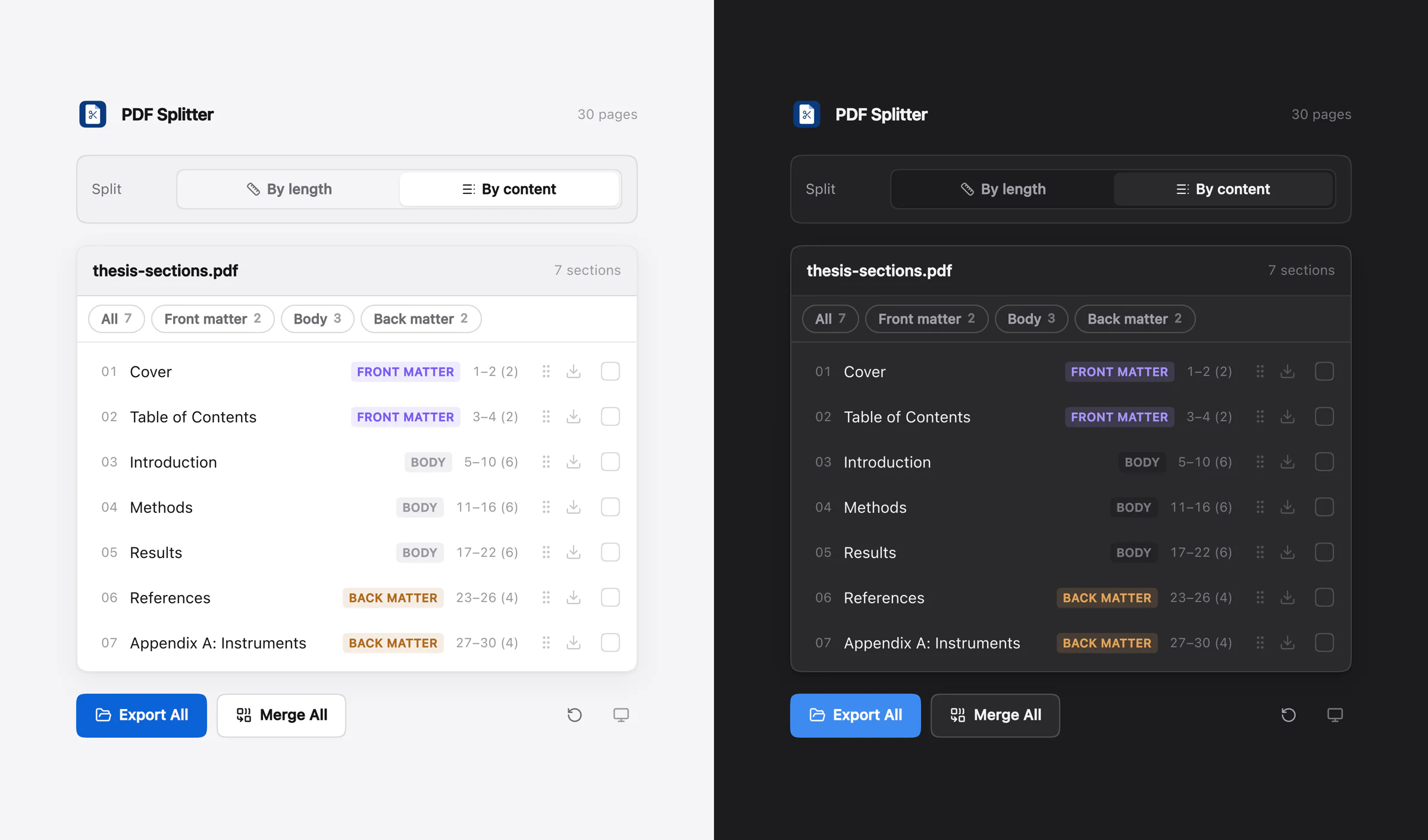
Pills above the list select whole groups: All, plus Front matter, Body and Back matter when the document has them. They combine, and every row also has its own checkbox. Export and Merge run on the current selection, or on everything when nothing is selected.
This answers the assignment problem directly. Body only is one click. Chapters three to nine is seven. Titles found by inference get matched against the same front and back matter patterns used for real bookmarks, so References and Appendix A land in the right group whether they came from the outline or from the type.
Three ways to get the files out
Export writes every section to a folder named after the source PDF. Drag pulls a row straight into Finder or Explorer, and dragging a row that belongs to a selection takes the whole selection with it. Merge does the opposite job, joining a selection back into one PDF, with pages in document order whatever order they were ticked in and overlapping ranges unioned instead of duplicated.
Output names are zero padded, so a folder of chapters sorts in reading order and chapter 10 does not land next to chapter 1:
Doctoral Thesis - Part 01.pdf             (by length)
Doctoral Thesis - 01 - Introduction.pdf   (by content)
Doctoral Thesis - Selection.pdf           (merged)
The design language
The app had to run as a desktop window and as a web page from one codebase, which put the design between two sets of conventions. A web app dropped onto the desktop looks like a website in a frame. A faithful macOS app does not survive being opened in a browser tab. I designed for the middle: native enough that the window sits beside Preview and Finder without drawing attention to itself, plain enough that the same screen still works on the web.
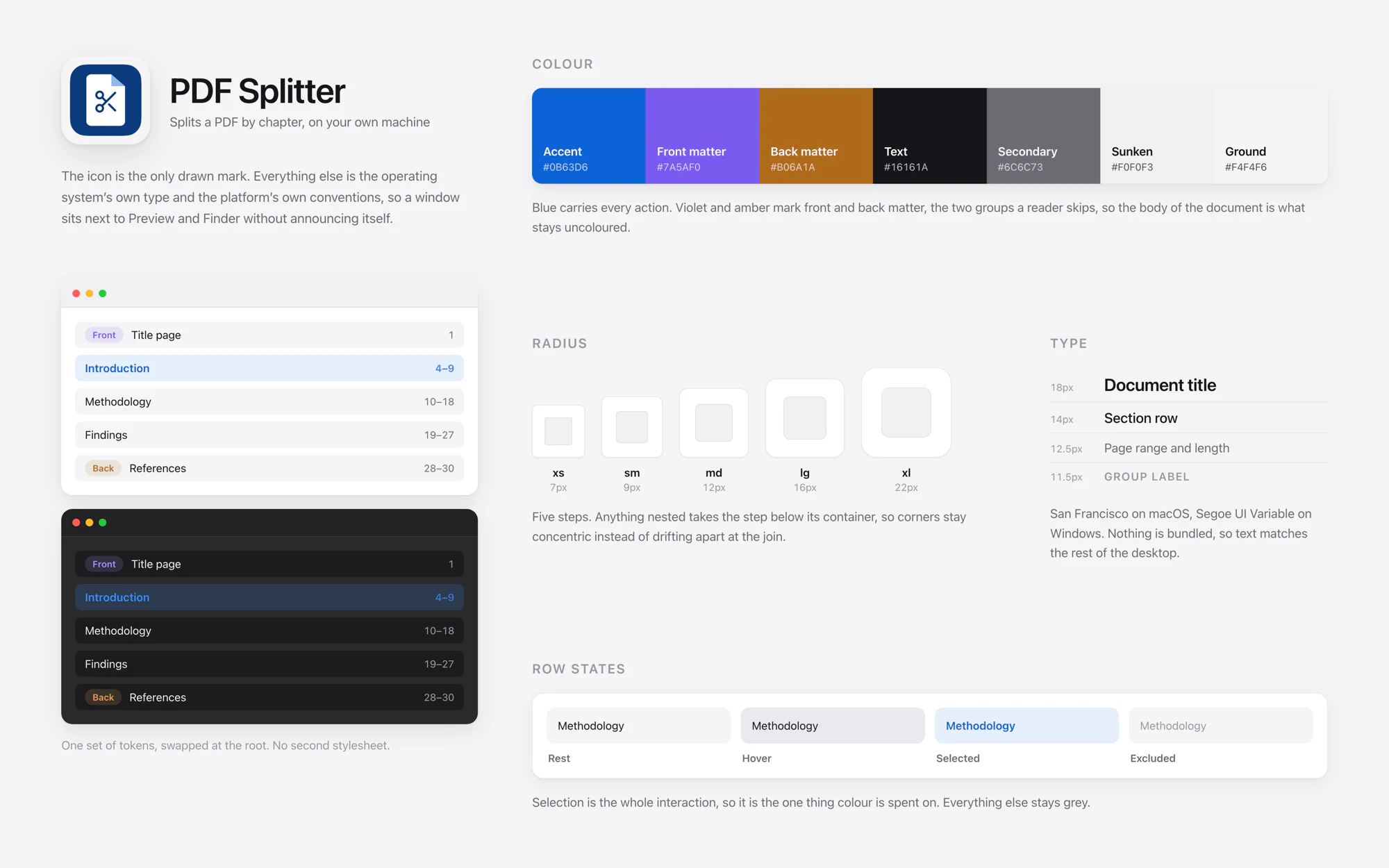
Most of the decisions came down to weight. Type is the system font on each platform, San Francisco on macOS and Segoe UI Variable on Windows, so text matches the rest of the desktop and no font ships with the app. The palette is light and mostly grey. One blue carries every action. Violet and amber mark front matter and back matter, the two groups a reader tends to skip, which leaves the body of the document as the part with no colour on it at all.
Radii run on a five step scale, and anything nested takes the step below its container so corners stay concentric at the join. The icon is the only drawn mark on the project. There is no logotype, no brand typeface and no illustration anywhere in the app. A utility that holds attention for fifteen seconds does not need a personality, and keeping it quiet is what lets a dense list of sections stay readable.
Light and dark
Both follow the OS setting and change with it, without a restart. The button in the corner cycles through system, light and dark for anyone who wants to override it, and the choice is remembered. Continuous corners sit behind a feature query, so browsers without them fall back to a circular radius and not a broken layout.
Building it to run anywhere
One constraint decided almost everything else: it had to work on any machine I sit at, including a borrowed one, with nothing installed and no connection.
That ruled out Electron, which ships a copy of Chromium inside every app. Tauri uses the webview the operating system already has, so the download is a few megabytes against a few hundred. For a utility that does one thing, a 200MB download is the step where people give up and go back to the website that wanted their file.
src/core imports no React, no Tauri and no browser API. Splitting, outline
parsing, heading detection and the OCR plumbing all live there, and the same code runs in
the desktop app, in a browser, and under Node in the tests. The only files that differ
between targets are the platform adapters, which is what makes "does it behave the same on
the web" a question with an actual answer.
Two features need OS APIs and stay desktop only: reading scanned pages, and dragging several sections out at once. The browser build says so instead of failing quietly. Opening a scan on the web reports that recognition is unavailable, and does not return nothing and leave the reason to be guessed at.
Speed came from keeping work separate. The outline is parsed with pdf-lib, walking the outline dictionaries directly, which holds first paint at 71 KB gzipped. pdf.js loads lazily and only for heading detection and OCR, so a document with a real table of contents never pays for it. Planning is also kept apart from extraction: changing an option recomputes page ranges and nothing else, about a millisecond on a 600-page document, and no PDF is written until an export or a drag begins. That is why the depth control and the group pills stay instant on a file a browser tool would still be uploading.
Where it stands
The desktop app was the original plan. The browser build became the version worth pointing people at, because it is the one with no step before using it. The static build is served straight from the repository through Cloudflare Pages, so a push to the branch is the deploy.
71 KB gzipped to first paint. About 1 ms to replan a 600-page document. Three ways to recover chapter structure before it falls back to equal parts. Zero network calls, on either build.
Free, MIT licensed, and it runs with the network switched off.
There are no download or usage figures quoted here because there are none worth quoting yet. It is a free tool, recently published, and the only honest measure so far is that the people it was built for continued using it.
Code signing is the one problem a decision could not solve. The app is unsigned, so macOS asks for a right-click and open the first time and Windows shows a SmartScreen warning. A Developer ID is $99 a year, a Windows certificate a few hundred, and SmartScreen disregards a new certificate anyway until the app builds up download reputation. For a free tool with no revenue that is a real cost with a delayed payoff, so the readme explains what the warnings mean and building from source avoids them entirely.
What I would do next
Recognition accuracy is the obvious one. Headings are found reliably in a clean scan and unreliably in a poor one, and most of the documents that defeat the tool are poor scans.
I assessed putting a small language model behind the detection, locally or over an API, so that chapter boundaries could come from meaning instead of type size. It would help on exactly the documents the current approach cannot read. I ruled it out, for the reason the tool exists: it would require either a download measured in gigabytes or a network call carrying a file the user was promised would never leave their machine. Either one breaks the premise. A version that does neither is worth building, and I have not found one.
The change worth making most is an Obsidian plugin: right-click a PDF in the vault, split it, and have twelve chapters appear in the panel where the one file used to be. That closes the loop back to where the project started, which was never about PDFs. It was about the notes.
What I took from it
Every constraint on this project came from one sentence: it has to work on a machine with nothing installed and no connection. That chose Tauri over Electron, the OS recogniser over a bundled engine, and pdf-lib over pdf.js, and it ruled out the language model. Settling one principle properly at the start made most of the later decisions, and the ones it did not make were easy to identify, because they were the ones arguing with it.
The second is that designing as the user got this most of the way there, and handing it to other people got it the rest. The selection model, the confidence warning and the depth control that states how many files each option produces all came from using the tool against real documents. What I would not have arrived at alone is that the people who needed it most were not those with the heaviest documents. They were the ones who were not permitted to upload.